Migrate Ingress from nginx to Envoy Gateway
Move your cluster's HTTP routing from the nginx ingress controller to Envoy Gateway in small steps. Each step is a button in the cluster's migration panel, and you can go back at every step until you finish.
New to this? Read the beginner walkthrough.
Overview
The migration has five stages. nginx keeps serving traffic until you move DNS. Envoy Gateway is installed next to nginx first, so you can send it real traffic before any customer-facing change.
AWS (EKS) only. The migration is available on AWS clusters today. Azure and GCP support is on the roadmap.
Prerequisites
- An AWS EKS cluster on SeaGit in the Started state. Clusters on other providers, or clusters that are stopped, refuse each step.
- A cluster that runs the nginx ingress controller. Prepare fails when there is no nginx release to copy routes from.
- Room for two more pods. Envoy Gateway runs two replicas. On a full node group the new pods stay Pending, so add capacity first.
- Permission to update the cluster. The panel and the API both check it.
- Ingress annotations that Envoy can serve. Any blocker stops Move DNS to Envoy. See Ingress blockers.
- For the API only: an API key (
sgt_…) or a Firebase ID token, plus your organization ID, cluster ID and account ID.
Migrate in the console
Open the cluster and find the ingress migration panel. The stage tracker at the top shows where the cluster is: NGINX, Envoy ready, Shifting traffic, DNS on Envoy, or Envoy only. The button for the next step is highlighted. Long-running steps show a progress banner with the step name and elapsed time, and the banner updates automatically, so you do not need to reload the page.
Step 1. Prepare Envoy
Click Prepare Envoy. SeaGit installs Envoy Gateway and its own load balancer, then converts every nginx Ingress into Gateway API HTTPRoute objects, so Envoy has the same hosts and paths. No traffic moves, so customers still reach nginx. The badge changes to NGINX · Envoy ready.
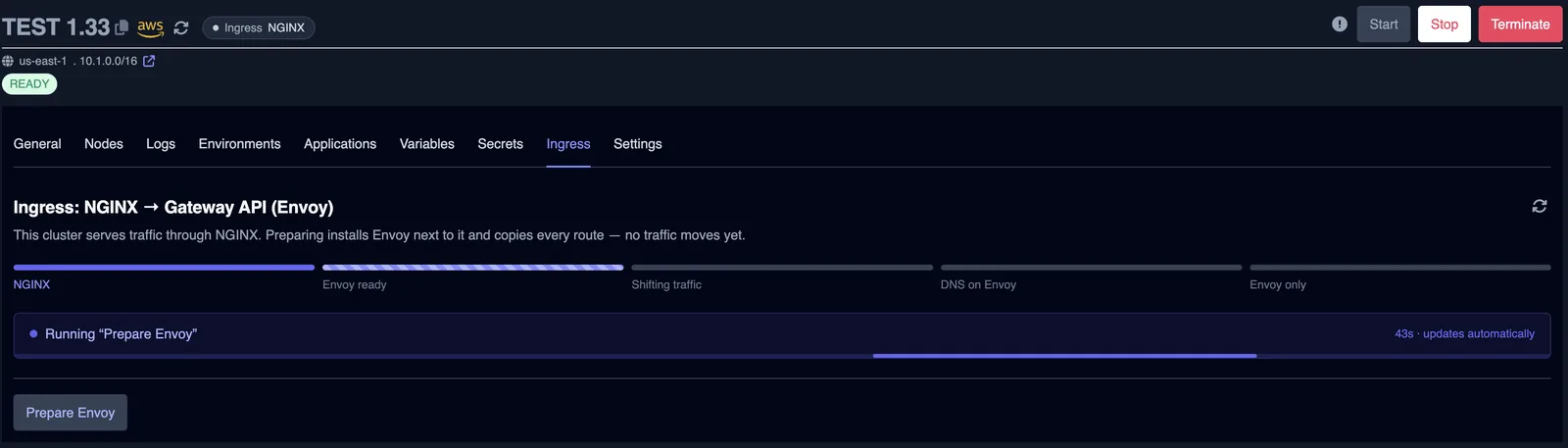
Undo: Abort migration removes Envoy and its routes, and nginx keeps everything. Re-run prepare is safe to repeat, for example after you add node capacity.
Step 2. Shift traffic to Envoy (canary)
This step is a canary deployment for your ingress. Under Send to Envoy, pick a share: 10%, 25%, 50% or 100%. nginx forwards that share of requests to Envoy through an nginx canary Ingress and serves the rest itself, while DNS stays where it is. Because the split happens inside the cluster, Envoy is tested with real requests and lowering the share does not wait on DNS caches. Wait, check your apps and error rates, then move to the next share. The badge reads Envoy 25% → 50% while a change is running and Envoy 25% when it is done.
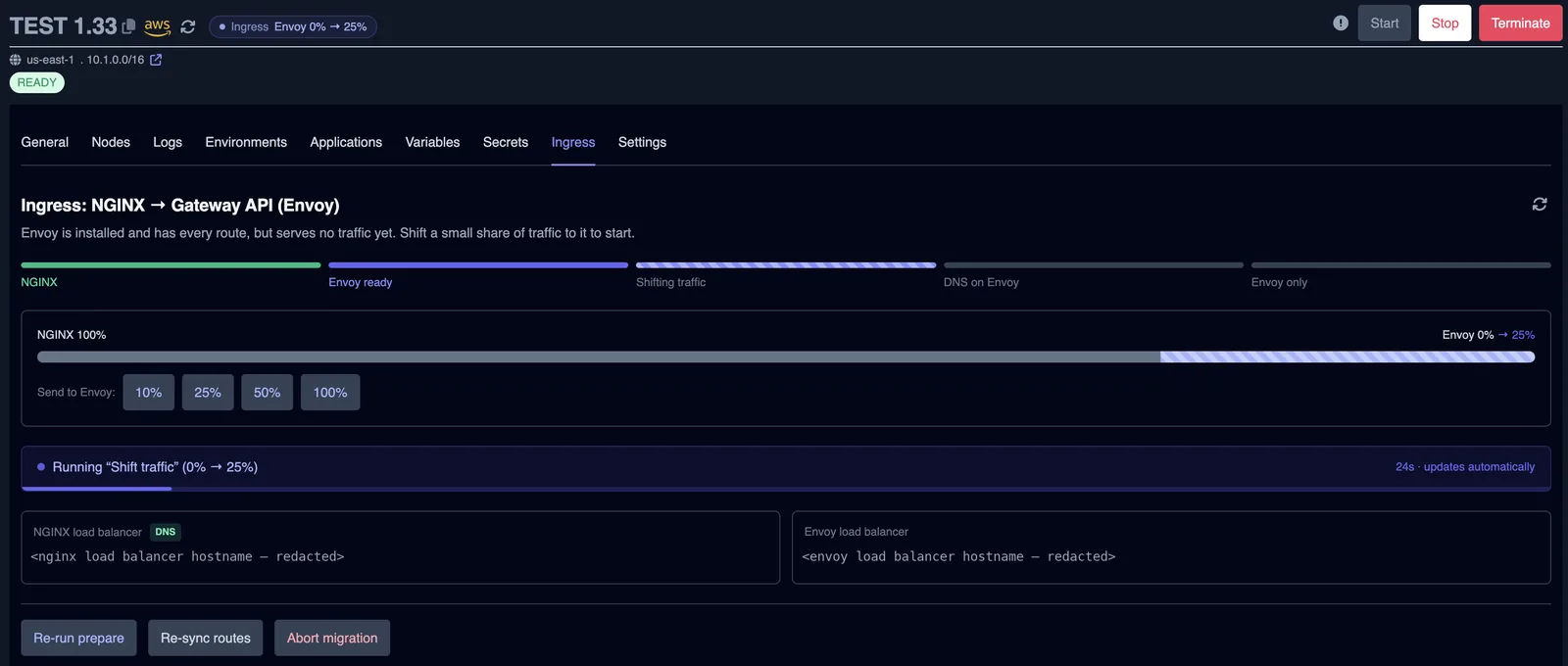
Undo: the 0% button sends all traffic back to nginx. Abort migration is also available here.
Step 3. Send all traffic to Envoy
Choose 100%. Envoy now serves every request through nginx. This is the state where Move DNS to Envoy becomes available, and only when no blockers are listed.
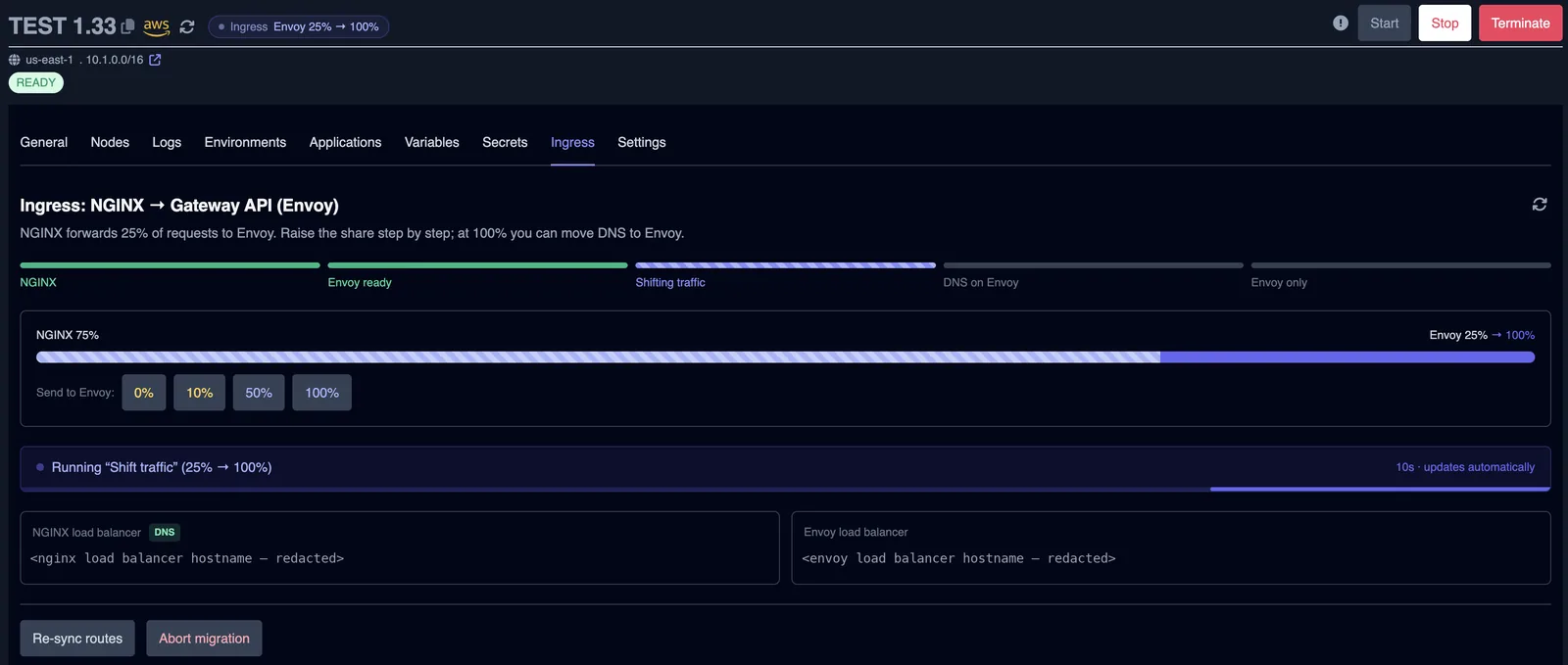
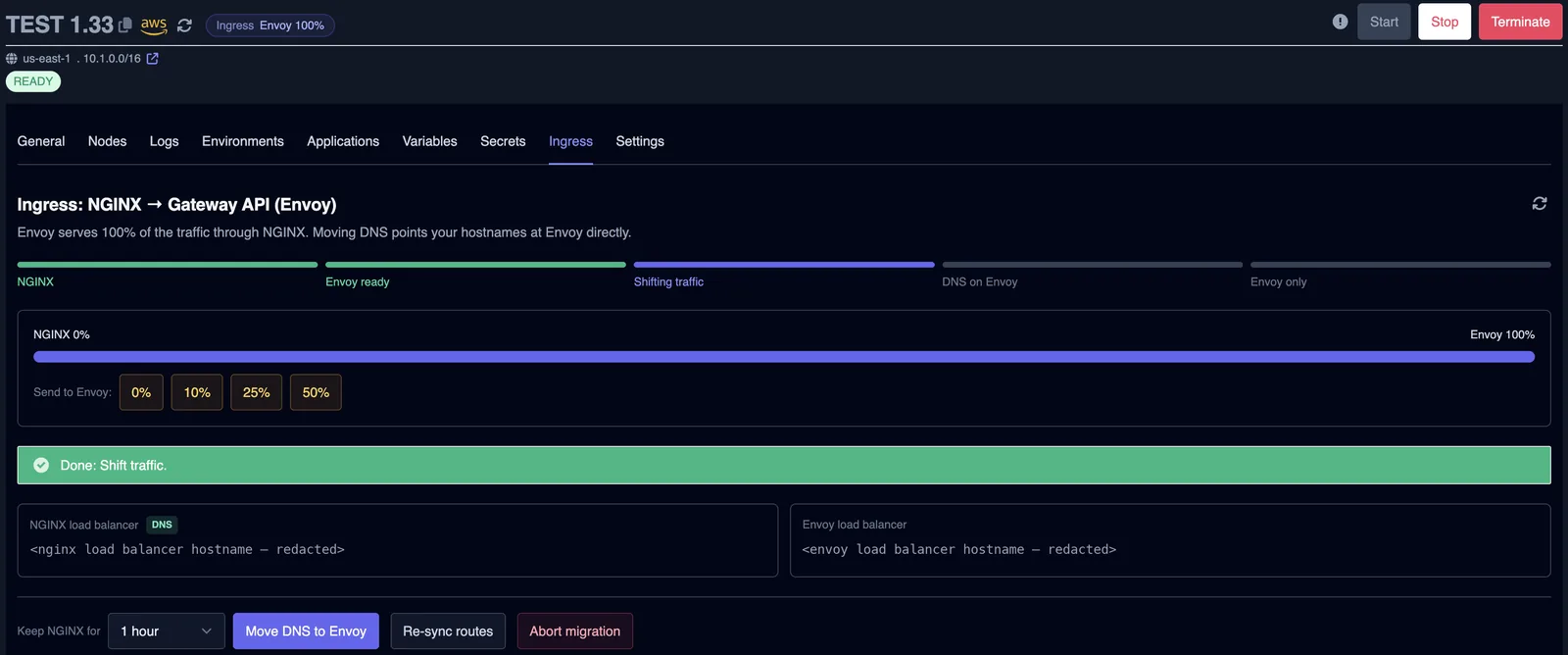
Undo: lower the share with the 0% button, or use Abort migration.
Step 4. Choose the soak period
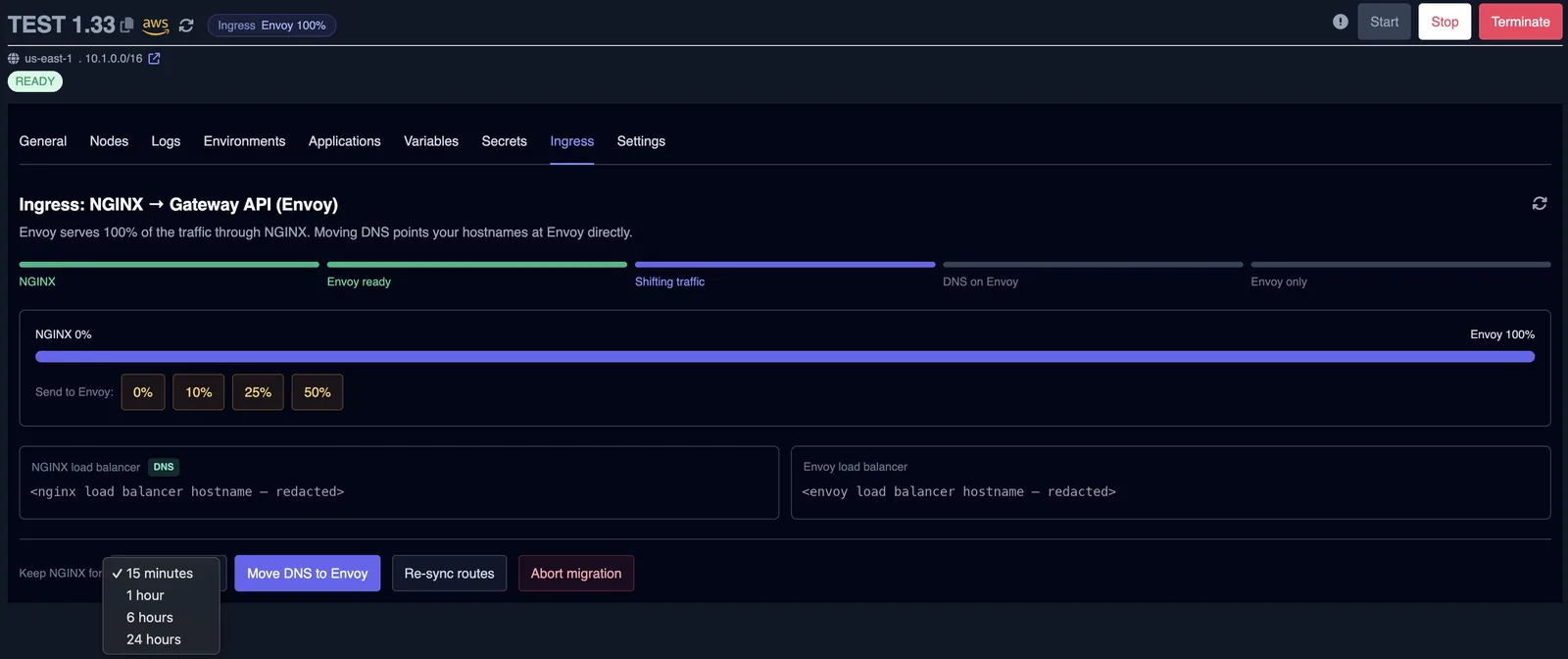
Next to Move DNS to Envoy is a Keep NGINX for list: 15 minutes, 1 hour (the default), 6 hours or 24 hours. This is how long nginx stays up after DNS moves. Pick a longer period when you want more time to watch Envoy under real traffic.
Step 5. Move DNS to Envoy
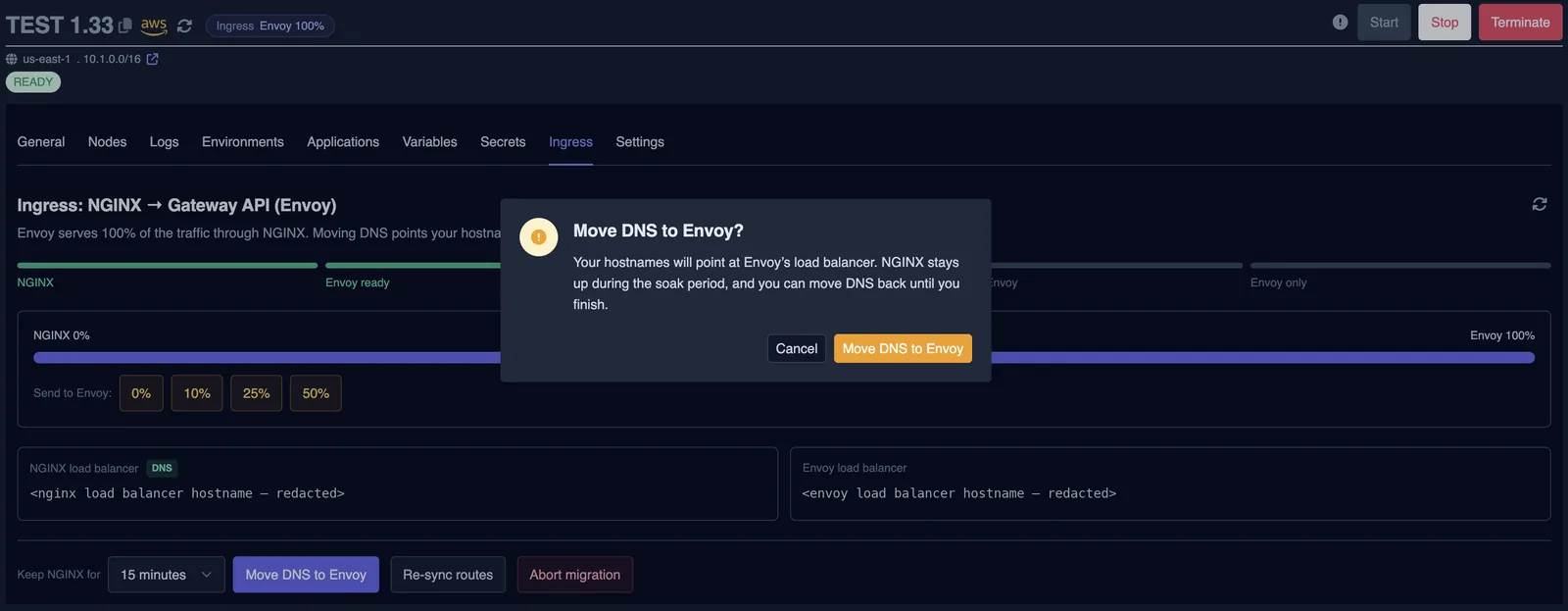
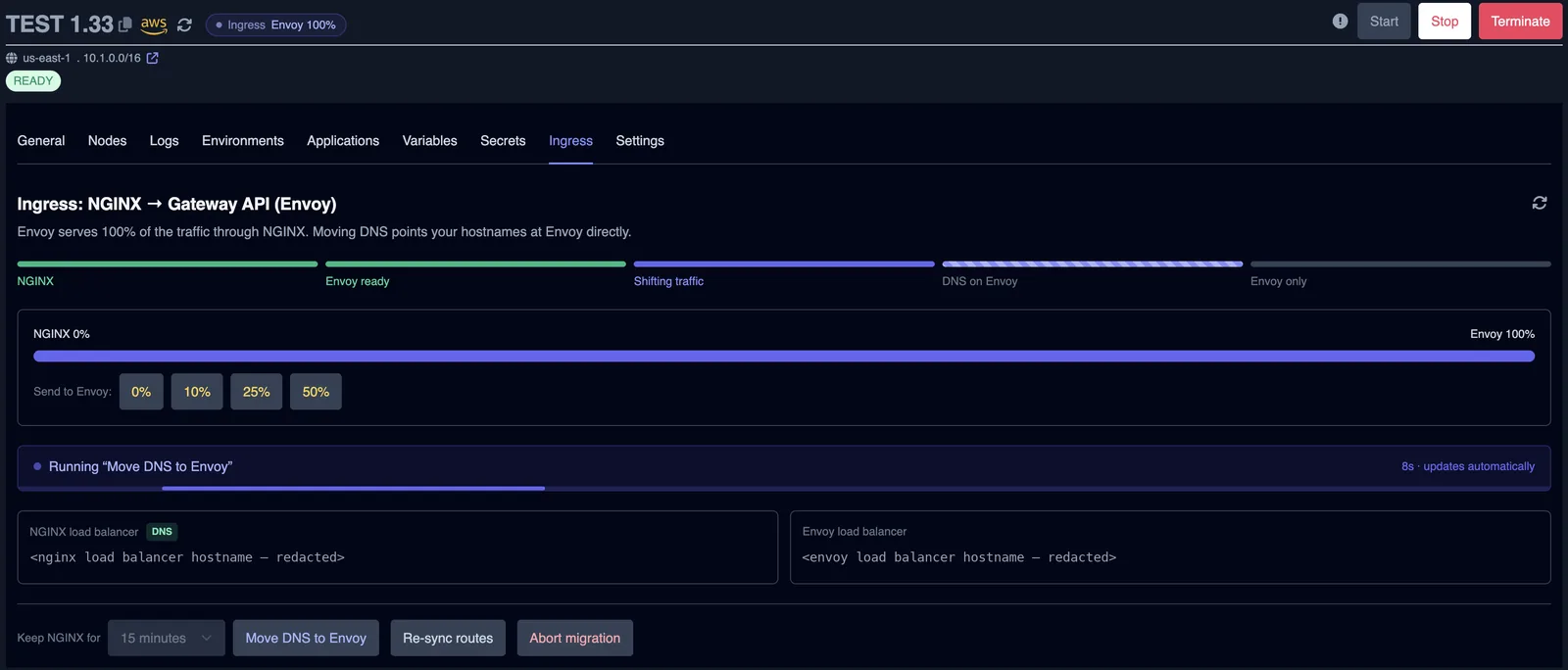
Click Move DNS to Envoy and confirm. Your hostnames now point at Envoy's load balancer. The step runs in the background and updates automatically. When it finishes, the stage reads DNS on Envoy and the countdown for the soak period starts.
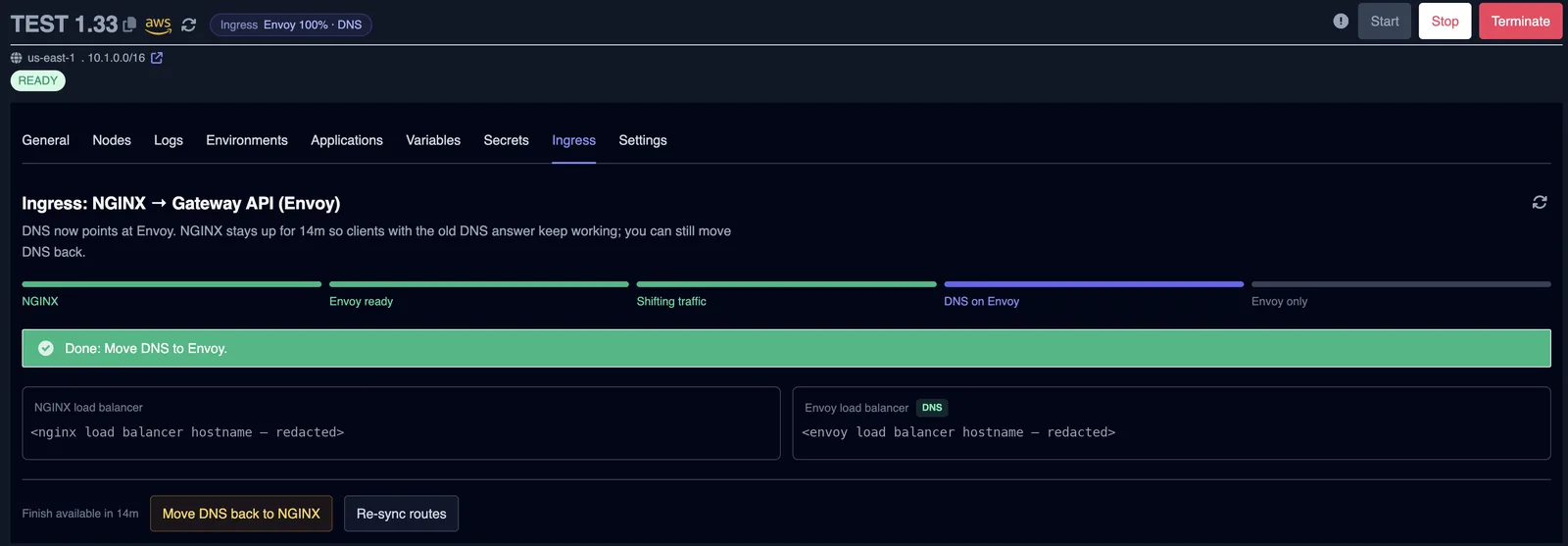
Undo: Move DNS back to NGINX (confirm the dialog) points hostnames at nginx again. Envoy keeps running at 100%. Abort migration is no longer offered once DNS has moved.
Step 6. Finish and remove NGINX
When the soak period ends, Finish and remove NGINX becomes available. Finish first checks that every nginx Ingress can be converted, that Envoy serves the routes, and that DNS points at Envoy. Only then does it uninstall nginx and delete its load balancer. Confirm the dialog to start it.
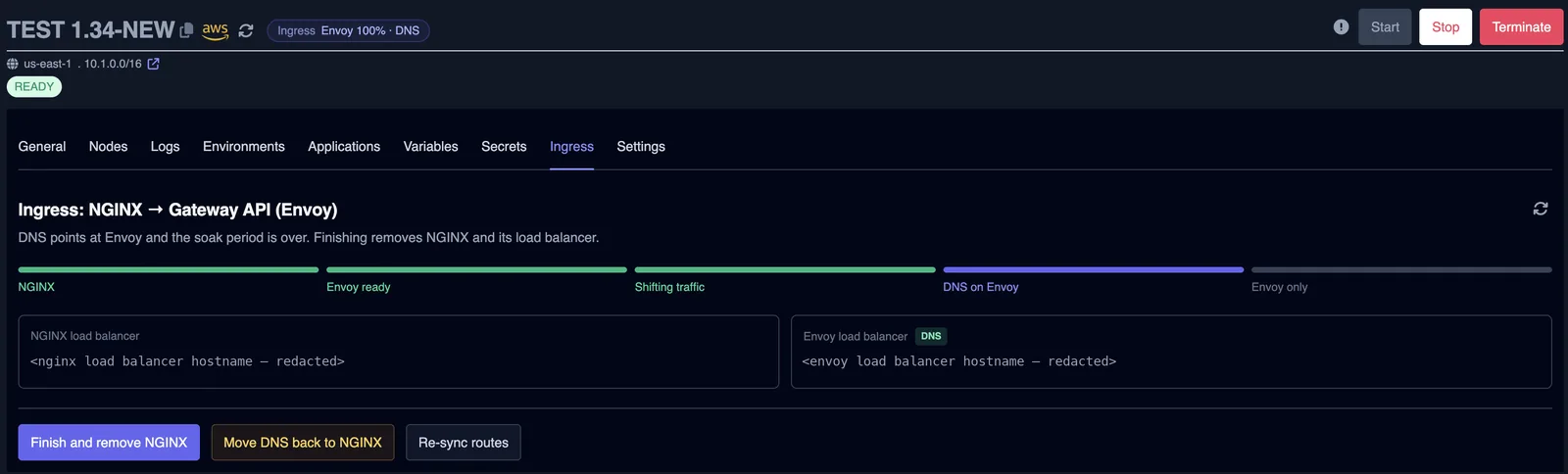
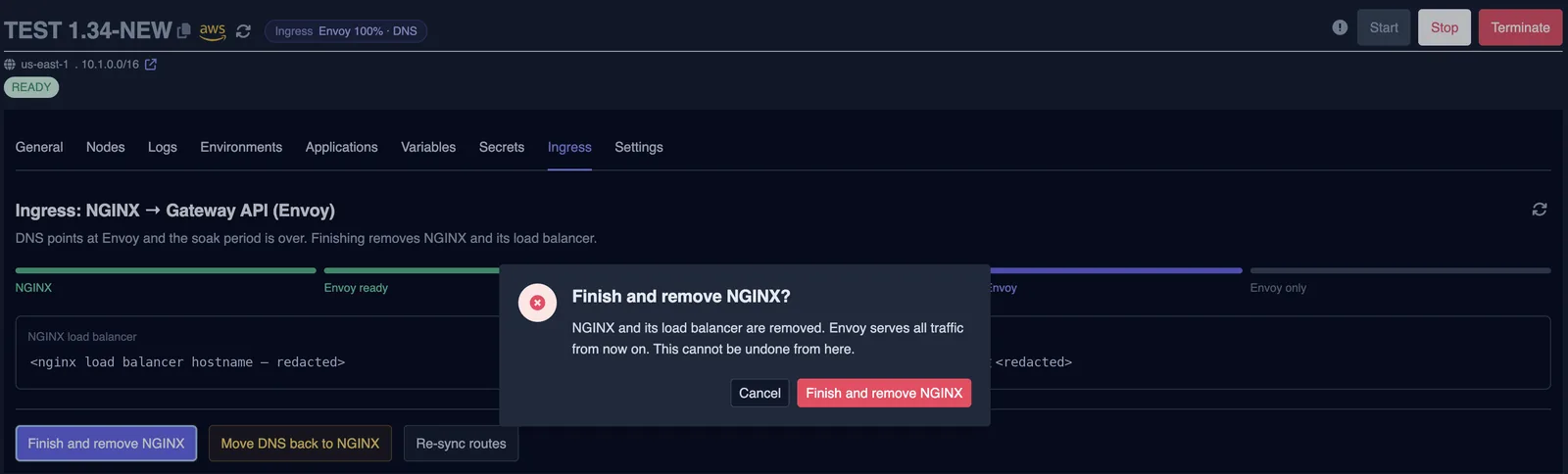
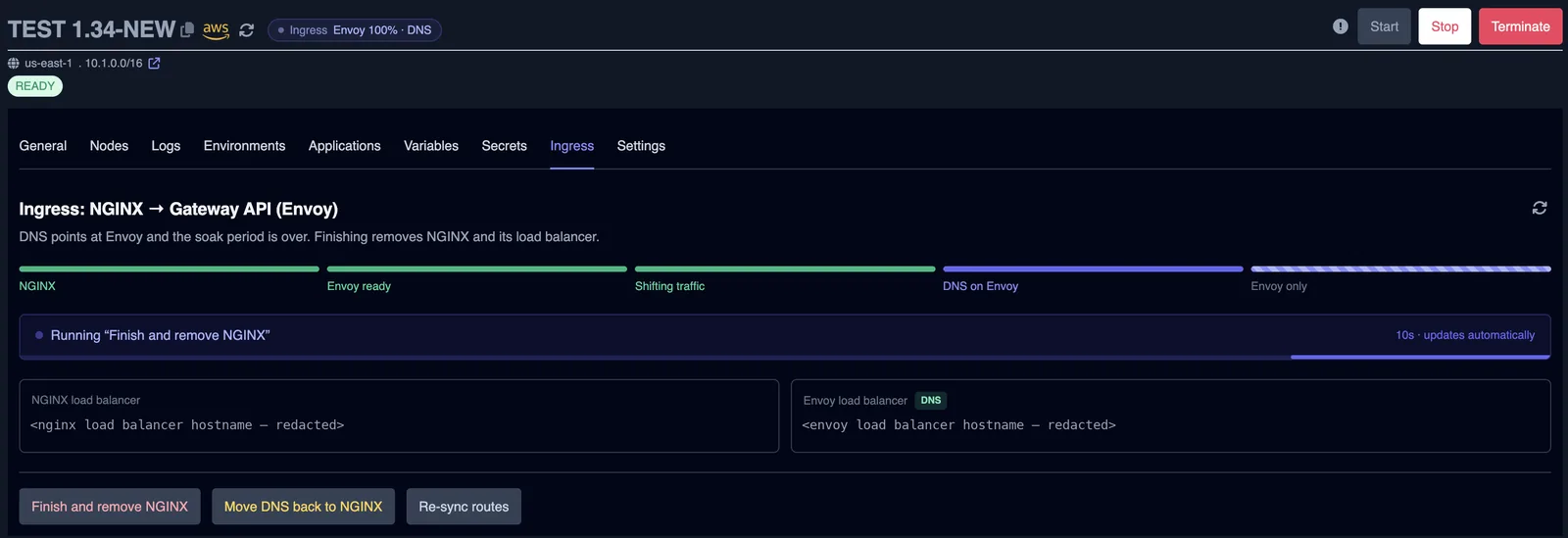
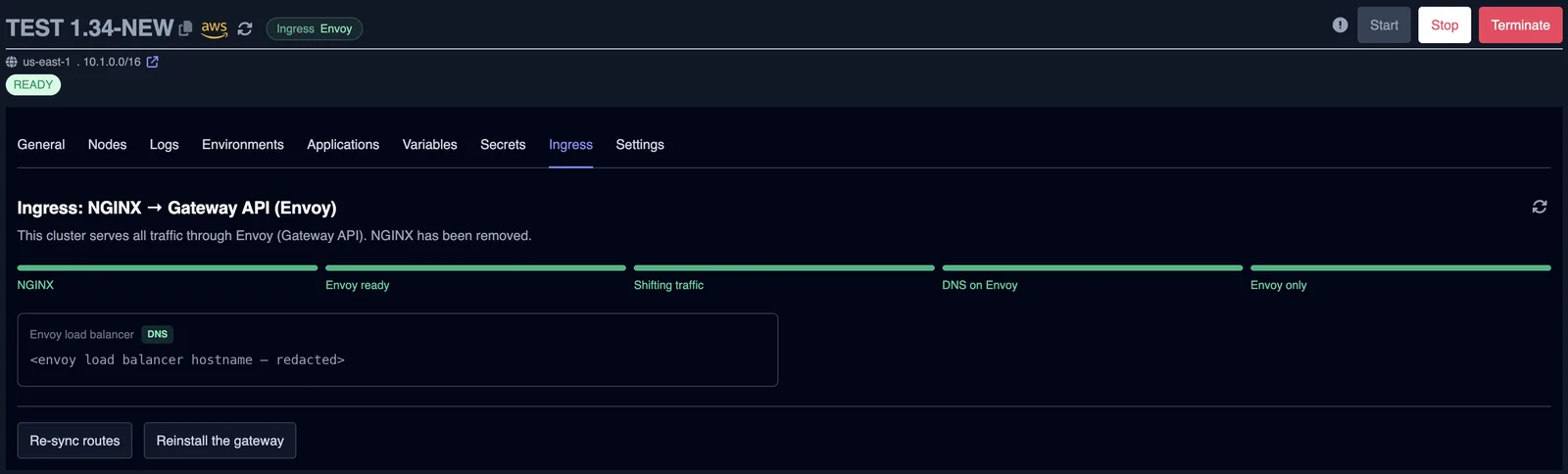
Undo: none. Finish is the point of no return.
Step 7. Check your apps
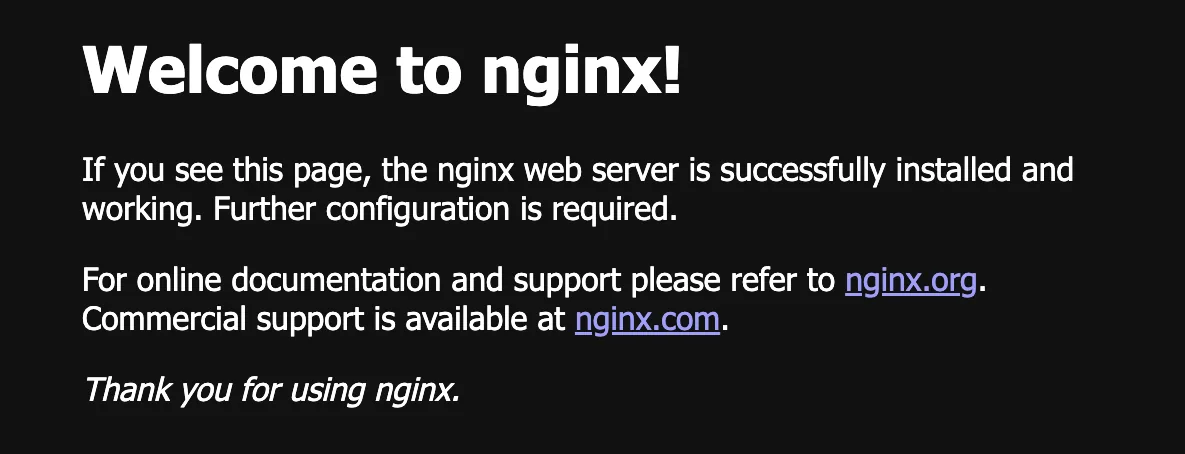
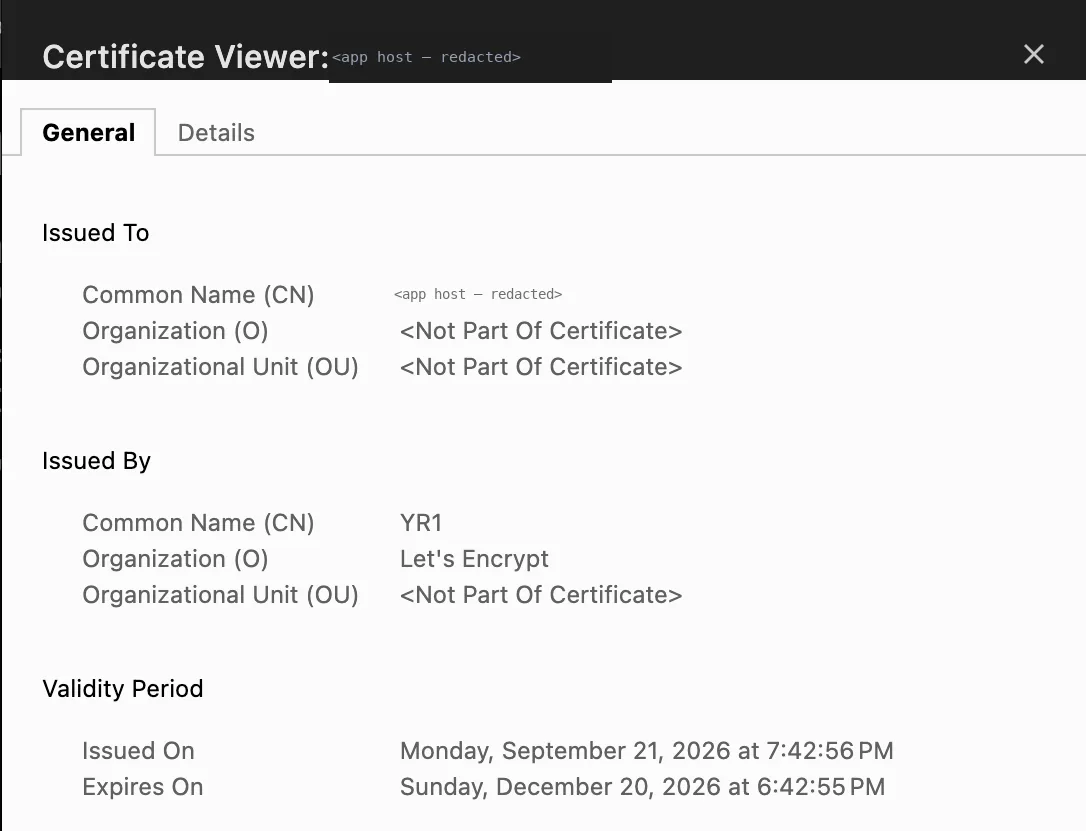
After finish, confirm that your apps load through Envoy and that their TLS certificates are valid. The screenshots below show an app served through Envoy and the certificate for its host.
Check the migration status
The badge next to the cluster's ingress shows the state in one line:
| Badge | Meaning |
|---|---|
| NGINX | Only nginx. No migration started. |
| NGINX · Envoy ready | Envoy is installed. No traffic on it yet. |
| Envoy 25% → 100% | A traffic change is running toward 100%. |
| Envoy 100% · DNS | DNS points at Envoy and the soak period runs. |
| Envoy | Migration complete. nginx is removed. |
Below the stage tracker, the panel lists blockers, the load balancer addresses, and the result of the last step. A failed step shows its error in a red banner.
The same information comes from the API. Send a GET request and read these fields:
phase:none→prepared→shifting→soak→doneweight: share of traffic on Envoy (0, 10, 25, 50 or 100)envoy_addressandnginx_address: the load balancer addressessoak_until: when Finish becomes availablepending: the queued step, withactionandts, ornullwhen nothing is runningallowed_actions: the actions the cluster accepts nowblockers[]: each withnamespace,ingress,annotationandreasonlast_actionandlast_action_error: the last step and why it was refused (empty when it succeeded)routes_settledandpending_sources: whether any route is still kept in step by the migration (see deploying apps)
Ingress blockers
A blocker is an Ingress that Envoy cannot serve the same way nginx does. The panel lists each one with its namespace, Ingress name and annotation. Move DNS to Envoy stays disabled, and Finish is refused, until the list is empty.
Any nginx annotation that is not on the supported list blocks the migration. Common examples:
nginx.ingress.kubernetes.io/auth-url: external authnginx.ingress.kubernetes.io/auth-type: auth typenginx.ingress.kubernetes.io/rate-limit: rate limitingnginx.ingress.kubernetes.io/rewrite-target,use-regex, and configuration snippets
These are converted and do not block: proxy-body-size, proxy-read-timeout, proxy-send-timeout, ssl-redirect, force-ssl-redirect, whitelist-source-range, backend-protocol, secure-backends, the proxy-next-upstream family, and session affinity with the cookie value.
Two more things block: a DNS record pinned to another target, and a SeaGit routing setting with an invalid value.
To fix a blocker: remove or replace the annotation in the Ingress manifest and redeploy the app. The deploy syncs its routes during the migration. For an Ingress created outside SeaGit, click Re-sync routes.
Deploying apps during and after the migration
During the migration (from Envoy ready to Finish), each app deploy or removal is followed by a route sync. The sync copies the app's Ingress to Envoy and does not change the traffic share or the stage. An Ingress created outside SeaGit is not synced on its own, so click Re-sync routes or send the sync action from the API.
After finish, syncing stops. Each deploy applies its own Gateway routes, and DNS follows Envoy's load balancer directly, including across cluster stops and starts. The panel says Nothing on this cluster needs syncing once that is true. If it is not, it lists the Ingresses that are still synced, such as an add-on's, and why.
Automate with the API
Each console step has an API action with the same effect. Every request goes to the same URL, and only the body changes. Replace the placeholders with your values:
$ORG_ID: your organization ID$CLUSTER_ID: your cluster ID$ACCOUNT_ID: your account ID$API_KEY: your API key (sgt_…)
The request URL is https://seagit.com/api/org/$ORG_ID/clusters/$CLUSTER_ID/ingress-migration?accid=$ACCOUNT_ID. A POST returns 202 Accepted with the view, and the step runs in the background. Poll the GET request to see when it finishes.
| Console button | POST body |
|---|---|
| Prepare Envoy | {"action":"prepare"} |
| Send to Envoy 10 / 25 / 50 / 100%, or 0% | {"action":"set_weight","weight":10} |
| Move DNS to Envoy (with Keep NGINX for) | {"action":"cutover","soak_seconds":3600} |
| Move DNS back to NGINX | {"action":"revert_dns"} |
| Finish and remove NGINX | {"action":"finish"} |
| Abort migration | {"action":"abort"} |
| Re-sync routes | {"action":"sync"} |
| Reinstall the gateway | {"action":"install_gateway"} |
Read the status (GET)
curl -H "Authorization: $API_KEY" \
  "https://seagit.com/api/org/$ORG_ID/clusters/$CLUSTER_ID/ingress-migration?accid=$ACCOUNT_ID"
1. Prepare Envoy
curl -X POST -H "Authorization: $API_KEY" \
  -H "Content-Type: application/json" \
  -d '{"action":"prepare"}' \
  "https://seagit.com/api/org/$ORG_ID/clusters/$CLUSTER_ID/ingress-migration?accid=$ACCOUNT_ID"
2. Shift traffic (weight must be 0, 10, 25, 50 or 100)
curl -X POST -H "Authorization: $API_KEY" \
  -H "Content-Type: application/json" \
  -d '{"action":"set_weight","weight":25}' \
  "https://seagit.com/api/org/$ORG_ID/clusters/$CLUSTER_ID/ingress-migration?accid=$ACCOUNT_ID"
3. Move DNS to Envoy, keeping nginx for 24 hours
curl -X POST -H "Authorization: $API_KEY" \
  -H "Content-Type: application/json" \
  -d '{"action":"cutover","soak_seconds":86400}' \
  "https://seagit.com/api/org/$ORG_ID/clusters/$CLUSTER_ID/ingress-migration?accid=$ACCOUNT_ID"
4. Move DNS back to NGINX
curl -X POST -H "Authorization: $API_KEY" \
  -H "Content-Type: application/json" \
  -d '{"action":"revert_dns"}' \
  "https://seagit.com/api/org/$ORG_ID/clusters/$CLUSTER_ID/ingress-migration?accid=$ACCOUNT_ID"
5. Finish and remove NGINX (only after the soak period)
curl -X POST -H "Authorization: $API_KEY" \
  -H "Content-Type: application/json" \
  -d '{"action":"finish"}' \
  "https://seagit.com/api/org/$ORG_ID/clusters/$CLUSTER_ID/ingress-migration?accid=$ACCOUNT_ID"
Abort (before DNS moves)
curl -X POST -H "Authorization: $API_KEY" \
  -H "Content-Type: application/json" \
  -d '{"action":"abort"}' \
  "https://seagit.com/api/org/$ORG_ID/clusters/$CLUSTER_ID/ingress-migration?accid=$ACCOUNT_ID"
Re-sync routes
curl -X POST -H "Authorization: $API_KEY" \
  -H "Content-Type: application/json" \
  -d '{"action":"sync"}' \
  "https://seagit.com/api/org/$ORG_ID/clusters/$CLUSTER_ID/ingress-migration?accid=$ACCOUNT_ID"
Reinstall the gateway (on a cluster without nginx)
curl -X POST -H "Authorization: $API_KEY" \
  -H "Content-Type: application/json" \
  -d '{"action":"install_gateway"}' \
  "https://seagit.com/api/org/$ORG_ID/clusters/$CLUSTER_ID/ingress-migration?accid=$ACCOUNT_ID"
Wait until the queued step finishes
# pending is null once the worker has answered
while true; do
  STATUS=$(curl -s -H "Authorization: $API_KEY" \
    "https://seagit.com/api/org/$ORG_ID/clusters/$CLUSTER_ID/ingress-migration?accid=$ACCOUNT_ID")
  if [ "$(echo "$STATUS" | jq -r '.data.pending')" = "null" ]; then
    echo "$STATUS" | jq '.data | {phase, weight, last_action_error}'
    break
  fi
  sleep 10
done
set_weight accepts only 0, 10, 25, 50 or 100. Any other value returns 400.
Rolling back
| Where you are | Console | API |
|---|---|---|
| Envoy ready or shifting traffic | Send to Envoy 0%, or Abort migration | set_weight 0, or abort |
| DNS on Envoy (soak period) | Move DNS back to NGINX, then Send to Envoy 0% | revert_dns, then set_weight 0 |
| Envoy only | No rollback. nginx is gone. | none |
After Move DNS back to NGINX, the stage returns to shifting traffic at 100%. Envoy keeps running, so you can move DNS to it again later. Reinstall the gateway sets up Envoy Gateway on a cluster that runs without nginx. It does not bring nginx back.
Troubleshooting
400 on a step
The action, weight or soak_seconds value is invalid. Allowed actions: prepare, set_weight, cutover, revert_dns, finish, abort, sync, install_gateway. Allowed weights: 0, 10, 25, 50, 100. soak_seconds is a whole number from 0 to 604800 (7 days).
409 step not allowed
The step does not fit the current stage, another step is still running, the cluster is not Started, or it is not an AWS (EKS) cluster. The error message lists the actions allowed now. Check allowed_actions in the GET response.
502 step could not be queued
Nothing ran, and the cluster does not show the step as pending. Send the same request again.
Prepare fails
The reason is in last_action_error. The most common cause is a node group without room for the two Envoy pods. Add capacity, then run Prepare Envoy again. It is safe to repeat.
Blockers stop the DNS move
Read the blocker list in the panel or in the GET response. Fix each Ingress as described in Ingress blockers, redeploy, then click Re-sync routes.
Finish says DNS has not moved to Envoy
A hostname still resolves to nginx. Finish stops before it deletes anything. Wait for DNS to update, check the record, then run Finish again.
A step shows as running for a long time
If no worker answers a queued step for 30 minutes, the step is treated as lost. The panel stops showing it as running, and you can send it again.
last_action_error is not empty
The last step was accepted but could not finish. Fix the cause and send the step again — every step is safe to repeat. Most failed steps leave the cluster as it was; Finish is the exception, because it may already have removed NGINX before it failed, so repeat Finish rather than moving DNS back.
Frequently asked questions
Can I undo the migration?
Yes, until you finish. Before the DNS move you can abort, which removes Envoy and leaves nginx serving everything. After Move DNS to Envoy you can move DNS back to NGINX during the soak period. Finish and remove NGINX has no way back.
Which clusters can I migrate?
AWS (EKS) clusters on SeaGit that are in the Started state. Other providers are not supported yet, and each step needs a started cluster.
Do I need Kubernetes 1.33 for the migration?
Gateway is offered as the ingress for a new cluster only when the Kubernetes version is 1.33 or newer. For an existing cluster, check that its version works with Envoy Gateway before you start. If prepare fails, the reason shows in last_action_error.
Do I need to change my app manifests?
Apps deployed from SeaGit keep their Ingress. While the migration runs, each deploy copies its routes to Envoy. An Ingress that uses an unsupported annotation blocks Move DNS to Envoy until you change it.
Why is Finish and remove NGINX not available?
Finish needs the soak period to end, every route to be live on Envoy, and DNS to point at Envoy. The panel shows Finish available in with the time left while the soak runs.
What happens if a step never starts?
A queued step that no worker answers for 30 minutes is treated as lost. The panel stops showing it as running, and you can send the step again.
Does the migration move DNS on its own?
No. DNS moves only when you choose Move DNS to Envoy and confirm the dialog.
Next steps
- Beginner walkthrough of the migration, with the same screenshots
- Why ingress-nginx is ending
- Explore the full API at /docs/swagger
- Read about cluster management and networking
- Troubleshooting guide for common issues