Wildcard TLS with cert-manager and DNS-01
By Muhammad Soliman
If you deploy many apps under one domain, such as app1.example.com, app2.example.com and preview-42.example.com, issuing a separate certificate per hostname stops scaling. Each new name waits on an issuance round trip, your ingress controller juggles dozens of secrets, and you move closer to Let's Encrypt's rate limits. A single wildcard certificate for *.example.com removes all three problems. cert-manager can automate its whole lifecycle. The catch is that wildcards can only be issued with the DNS-01 challenge, and DNS-01 is where the real work is.
This guide covers how to set up DNS-01 with cert-manager and Route 53, how cross-account zones change the permissions, and which failures look like something else.
TL;DR
- A wildcard certificate needs the DNS-01 challenge. cert-manager proves control of the zone by writing a TXT record at
_acme-challenge.example.com. - On AWS, give cert-manager a role through IRSA instead of static keys. Scope the write permission to the hosted zone.
- For a zone in another AWS account, chain roles. The foreign role needs the record-change permissions and the zone lookup permission.
- Issue
example.comand*.example.comin one Certificate, then renewal and new subdomains cost nothing extra.
HTTP-01 and DNS-01, and why wildcards need the second
Two challenge types matter here. With HTTP-01, the certificate authority fetches a token from a well-known URL on the hostname you are requesting. It proves control of that hostname, and nothing else. It cannot prove control of every subdomain, so it cannot issue a wildcard.
With DNS-01, the client publishes a TXT record derived from the token and your account key at _acme-challenge.<domain>. Let's Encrypt queries that record. The Let's Encrypt challenge documentation describes it this way: the challenge proves control of the DNS for the domain, is harder to configure than HTTP-01, and is the only type that allows wildcard certificates. Control of the zone implies control of every name under it, which is why the wildcard is safe to issue.
The price is that cert-manager needs permission to write into your zone. That permission is the part to get right.
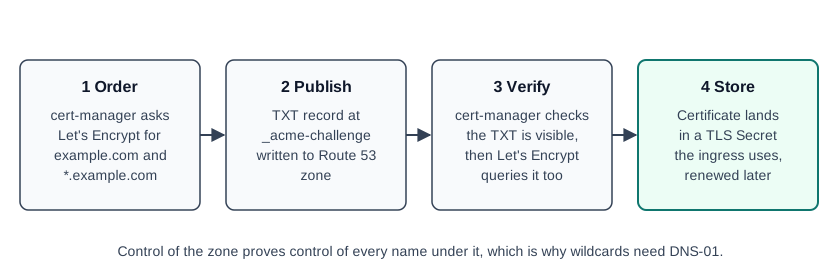 Figure 1: The DNS-01 flow, from order to a certificate stored in a Secret
Figure 1 summarises the sequence. The TXT record is short-lived. cert-manager creates it for the challenge, checks it, and the challenge completes.
Granting Route 53 access with IRSA
On EKS, the clean way to grant that permission is IAM Roles for Service Accounts (IRSA). You create an IAM role whose trust policy lets the cert-manager service account assume it through the cluster's OIDC provider, and you attach a policy that allows changes to the zone. Then the ClusterIssuer solver names the region and nothing else. No access keys sit in the cluster.
The cert-manager Route 53 guide gives the policy shape. It needs route53:GetChange, route53:ChangeResourceRecordSets and route53:ListResourceRecordSets on the hosted zone, and route53:ListHostedZonesByName on all resources. The change statement can carry a condition that limits record types to TXT, so the role cannot touch A records. Scope the change statement to the single zone ARN wherever you can. If you set the optional hostedZoneID on the solver, the ListHostedZonesByName statement can be removed.
The ClusterIssuer below uses the staging Let's Encrypt directory. Test there first, then switch the server value to the production directory. The role field appears in the cert-manager example for a cross-account zone and is covered in the next section.
apiVersion: cert-manager.io/v1
kind: ClusterIssuer
metadata:
  name: letsencrypt-staging
spec:
  acme:
    email: platform@example.com
    # Staging first. Switch to the production directory after the test passes.
    server: https://acme-staging-v02.api.letsencrypt.org/directory
    privateKeySecretRef:
      name: letsencrypt-staging-account-key
    solvers:
      - selector:
          dnsZones:
            - example.com
        dns01:
          route53:
            region: us-east-1
The selector restricts this solver to example.com. Without a selector, the solver applies to every name the issuer is asked for. The dnsZones field is the selector the cert-manager documentation describes for multi-zone issuers.
Test on staging for a practical reason. Let's Encrypt's staging environment has its own rate limits, which are much higher than production, and its certificates chain to roots that browsers do not trust. A misconfigured issuer on staging costs you nothing except time. The same misconfiguration on production can burn through the registration and issuance limits for your domain while you debug it. Keep the staging issuer in the cluster until the first certificate has issued and renewed correctly.
The cross-account case
The setup gets more interesting when the zone lives in a different AWS account from the cluster. This is normal on multi-account platforms. The workload runs in account A, and the customer's Route 53 zone sits in account B. The pattern is role chaining. The cluster's identity assumes a role in account B, and that foreign role carries the Route 53 permissions.
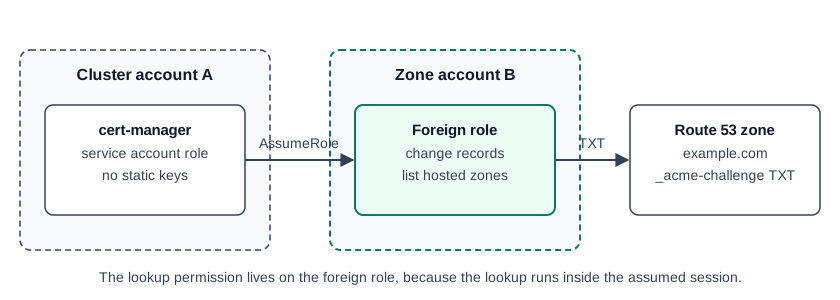 Figure 2: Role chaining for a zone in another account
cert-manager supports this through the role field on the Route 53 solver. It assumes that role before it touches the zone. The ClusterIssuer then looks like this:
solvers:
  - dns01:
      route53:
        region: us-east-1
        role: arn:aws:iam::222222222222:role/cert-manager-dns01
The account ID in that ARN is a placeholder. The foreign role's trust policy must allow the cluster-side identity to assume it, and its permissions policy must allow the record changes. Two gotchas come up repeatedly.
The first is the lookup permission. cert-manager locates the zone that owns a challenge domain by listing zones by name. That lookup runs with the assumed role's credentials. If the foreign role lacks route53:ListHostedZonesByName and the solver does not set hostedZoneID, the lookup is denied. The error reads as if the zone is missing, but the zone is fine, and the lookup was forbidden. When you see a "zone not found" error for a zone you can see in the console, check this permission before you check the zone name.
The second is determinism. Name the foreign roles predictably, per cluster and per provider, so that trust policies can be managed in Terraform and a cluster teardown can find and remove exactly the roles it created. Hand-made roles outlive the clusters that depended on them.
The Certificate resource is the easy part
After the IAM work, the Certificate itself is short. List both names in dnsNames, point issuerRef at the ClusterIssuer, and name the Secret your ingress will read:
apiVersion: cert-manager.io/v1
kind: Certificate
metadata:
  name: example-com-wildcard
  namespace: ingress-nginx
spec:
  secretName: example-com-wildcard-tls
  commonName: example.com
  dnsNames:
    - example.com
    - "*.example.com"
  issuerRef:
    name: letsencrypt-staging
    kind: ClusterIssuer
cert-manager stores the key pair in the Secret named by secretName. The ingress controller references that Secret, so a new app under the domain only needs an Ingress that names a host under the wildcard. It does not need its own certificate. cert-manager renews the certificate automatically. By default the renewal time is two thirds of the way through the certificate's lifetime. With the cert-manager default duration of 90 days, that puts renewal near day 60. Renewal happens in the background, so the Secret updates without a deploy.
Two details help when you audit this later. Let's Encrypt limits new certificates per registered domain, currently 50 per 7 days, and that limit is global across all accounts. A wildcard certificate counts once for many subdomains, which is one more reason to issue one wildcard rather than one per app. And a wildcard certificate covers only one label level. *.example.com covers app.example.com, but not a.b.example.com, so a nested naming scheme needs its own certificate.
Operational checks worth wiring up
Some failures look like a DNS problem but are not. Check these first when issuance hangs:
- Read the Certificate status. Run
kubectl describe certificate example-com-wildcard -n ingress-nginxand read its conditions. A Certificate that staysReady=Falsenames the stage that failed. - Describe the Order and Challenge resources. cert-manager creates an Order and one Challenge per name. Each Challenge carries its own status, and that status names the failing step more precisely than the controller logs do.
- Expect a propagation wait. cert-manager checks that the TXT record exists before it asks Let's Encrypt to validate. By default it queries the authoritative nameservers directly. Slow propagation shows up as a pending Challenge, not as an error.
One boundary: ingress TLS versus ALB and ACM
This guide covers certificates that your ingress controller terminates, such as nginx. If you terminate TLS on an AWS Application Load Balancer, the certificate comes from AWS Certificate Manager (ACM), and cert-manager is not involved. Do not point both systems at the same hostname, or you will spend time working out which one answered.
How SeaGit handles this
SeaGit automates the flow above for domains it manages and for Route 53 domains attached to a cluster. The facts below come from the product documentation and the cluster-worker code, as of October 2026.
- Issuers are created for you. The certificates documentation describes an nginx ingress on a Route 53 domain as a Let's Encrypt certificate issued through a DNS-01 issuer that the platform provisions. A Seagit-managed subdomain uses a managed wildcard, so you do not configure the challenge yourself.
- No static keys for Route 53. On the cluster add-on, the AWS option for DNS credentials is the cluster's IAM role (IRSA). The platform stores no AWS keys in the cluster for that option. A static-credential option also exists, and in that case the keys are stored as a Kubernetes Secret inside the cluster. The add-on's form text says so.
- Cross-account zones use assume-role. For a domain registered in SeaGit, the platform creates a foreign role in the zone's account. That role trusts the cluster's cert-manager role and carries the record-change permissions and the zone lookup permission, as covered above. The role name is derived from the cluster ID and the provider key, so it can be found and removed when the cluster is destroyed.
- Wildcards are optional per certificate. The Certificate that the platform renders lists the domain and adds
*.<domain>when wildcard issuance is enabled. - ALB uses ACM instead. An ALB terminates TLS itself and can only present an ACM certificate, so cert-manager is not used on that path. The certificates documentation says to use nginx when you want cert-manager, and an AWS domain when you want ALB with ACM. Managed (PowerDNS) domains have no ACM path, so they use nginx with the managed wildcard.
DNS and domains covers how the same zone is used for external-dns, and Domains covers the attachment flow. Cluster add-ons, including cert-manager, are listed in Clusters.
Frequently asked questions
How do I issue a wildcard certificate on Kubernetes?
Use cert-manager with the DNS-01 challenge. Request example.com and *.example.com in one Certificate, give cert-manager permission to write a TXT record to your zone, and let it handle issuance and renewal. HTTP-01 cannot issue a wildcard.
Why does cert-manager say my Route 53 zone is not found?
Often the role that cert-manager assumes lacks route53:ListHostedZonesByName. cert-manager lists zones by name to find the zone that owns the challenge domain. When that call is denied, the error can read as if the zone is missing. Add the permission, or set hostedZoneID on the solver so the lookup is not needed.
Can cert-manager issue certificates when the DNS zone is in another AWS account?
Yes. Set the role field on the Route 53 solver to a role in the zone's account. That foreign role needs the record-change permissions and the lookup permission, and its trust policy must allow the cluster-side identity to assume it.
Do I still need cert-manager if I use an AWS ALB?
No. An ALB terminates TLS with a certificate from ACM, so cert-manager has no role on that path. Use cert-manager for TLS that your ingress controller terminates, such as nginx, and do not run both for the same hostname.
Sources
Checked October 2026.
- cert-manager: Route 53 DNS01 configuration: the solver fields
regionandrole, the IAM policy shape, the IRSA and ambient-credential behaviour, and thehostedZoneIDnote. - cert-manager: DNS01 challenge provider: the
dnsZonesselector, and the self-check that queries authoritative nameservers before validation. - cert-manager: Certificate resource:
dnsNames,issuerRef, and the default renewal at two thirds of the duration. - Let's Encrypt: Challenge Types: DNS-01 as the only challenge type that issues wildcard certificates.
- Let's Encrypt: Rate Limits: the limit of 50 new certificates per registered domain every 7 days.