Kubernetes DNS 5-Second Timeouts and ndots
By Muhammad Soliman
A Kubernetes DNS problem usually shows up as a slow request, not as a DNS error. The application waits, a retry succeeds, and the latency graph grows a spike every few seconds. The two symptoms people search for most are a lookup that takes exactly five seconds, and a service that makes far more DNS queries than its code suggests. Both usually trace back to two settings in the pod's resolver configuration: ndots and the resolver timeout. This guide explains how each one works, shows how to read them, and gives a checklist that isolates the failing hop.
TL;DR
- A lookup of an external name such as
api.stripe.comcan cost five to six queries becausendots:5makes the resolver try every search domain first. - A lookup that stalls for exactly 5 seconds is almost always a dropped UDP packet followed by the resolver's default 5-second timeout, not a slow server.
- Fix
ndotsper pod withdnsConfig, or use a trailing dot on hot external names. Fix the timeout with the mitigations in the last section, after you confirm the cause. - Debug one hop at a time: pod resolver, the cluster DNS Service, a CoreDNS pod, then the upstream resolver.
How a Kubernetes DNS lookup works
Every pod gets an /etc/resolv.conf written by the kubelet. It points at the cluster DNS Service and lists search domains for the pod's namespace. The DNS Service load-balances to the CoreDNS pods in kube-system. CoreDNS answers names under cluster.local from the Kubernetes API. It forwards everything else to the upstream resolver it inherited from the node. On EKS, that upstream is the Amazon-provided DNS server, which AWS documents as living at the VPC's base address plus two, and at the link-local address 169.254.169.253.
You can see the configuration directly. The Kubernetes DNS debugging guide uses a dnsutils pod for this:
kubectl exec -ti dnsutils -- cat /etc/resolv.conf
The file in a typical pod looks like this. Your search list will differ by namespace, cluster and cloud provider:
search default.svc.cluster.local svc.cluster.local cluster.local google.internal c.gce_project_id.internal
nameserver 10.0.0.10
options ndots:5
Three lines do most of the work. The nameserver line is the cluster DNS Service IP. The search line is the list of suffixes the resolver appends. The options ndots:5 line controls when the search list is used at all.
The ndots:5 trap
The glibc resolver documentation defines ndots as the threshold for the number of dots a name must contain before it is tried as an absolute name first. The glibc default is 1. Kubernetes sets it to 5, so almost every name your application uses has fewer than five dots. Those names are tried against every search domain before the name is tried as written.
Take api.stripe.com, which has two dots. The resolver asks for api.stripe.com.default.svc.cluster.local, then api.stripe.com.svc.cluster.local, then api.stripe.com.cluster.local, then the VPC search domain. Each of those returns NXDOMAIN. Only the last attempt, the absolute name, returns an answer. Figure 1 shows the sequence.
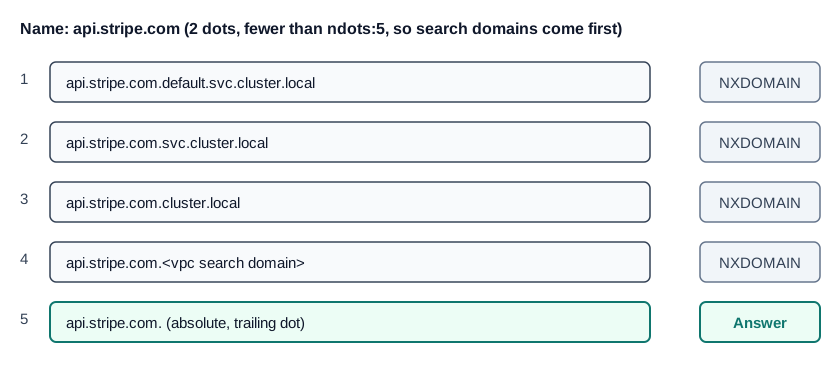 Figure 1: One external lookup becomes five queries under ndots:5, and each query is sent for both A and AAAA records
Every one of those attempts is sent for both A and AAAA records. A single external lookup can therefore produce ten queries, and eight of them are negative answers. Under load, that multiplies the query rate that CoreDNS and the VPC resolver must handle.
Two fixes work, and they can be combined.
Use a trailing dot on hot external names. A name ending in a dot is absolute, so the search list is skipped. Use api.stripe.com. in the connection string or the configuration file. This works regardless of the pod's ndots setting, which is why it is the safest fix for a known external host.
Lower ndots for the pod. The dnsConfig field merges extra options into the generated resolver configuration. The example in the Kubernetes DNS documentation sets ndots to 2 on a pod with dnsPolicy: None. The threshold works in the other direction from what people expect. With ndots:2, any name with at least two dots, such as api.stripe.com, is tried as an absolute name first. Names with one dot or none, such as redis or reports.internal, are still searched. For a pod that keeps the cluster policy, add the option without replacing the policy:
apiVersion: apps/v1
kind: Deployment
metadata:
  name: payments-api
spec:
  template:
    spec:
      dnsConfig:
        options:
          - name: ndots
            value: "2"
      containers:
        - name: api
          image: example/payments-api:1.4.0
Check the result after the rollout with kubectl exec and cat /etc/resolv.conf. If the file still shows ndots:5, the option did not merge, and the pod has not picked up the new spec.
The platform's seagit-infra repository has a CoreDNS module README with the same guidance. It describes ndots at 5 on EKS, the per-pod dnsConfig fix, and the trailing-dot approach for database endpoints.
The famous 5-second timeout
The glibc resolver waits a default of 5 seconds for a response before it retries. The timeout option sets that wait, and the man page gives the default as 5 seconds. A lookup that takes exactly five seconds has therefore lost a packet and is waiting for the retry. The server answered slowly is a different symptom, usually spread across a range of latencies rather than clustered at 5.
On Linux nodes that use conntrack for NAT, the common cause is a race. A pod sends its A and AAAA queries at the same time, from the same source port, and both packets go through connection tracking together. The Kubernetes issue tracker has carried this as "DNS intermittent delays of 5s" since 2018. An early comment from a project member says a 5-second delay almost always means a dropped DNS packet. A kernel fix for one form of the race landed in Linux 4.19, according to a later comment in the same issue. That is why the symptom is easier to hit on older kernels, and why the root cause should be confirmed on your own nodes before you tune anything.
The Kubernetes NodeLocal DNSCache documentation gives the design reason for the usual fix. Pods query a cache on their own node over UDP, and the cache can reach CoreDNS over TCP. That skips the NAT path for DNS and removes the race for that traffic. The same page notes that UDP DNS entries stay in the conntrack table until they time out, which fills it under heavy DNS load.
Three mitigations are used in practice:
- NodeLocal DNSCache. The documented fix for conntrack races and a per-node cache. It adds a component to run, so it is worth deploying when DNS query volume is high or the race is confirmed.
- The glibc
single-request-reopenoption. It is set in the pod'sdnsConfigoptions. The glibc man page describes it as changing how the resolver uses sockets for the A and AAAA requests. It is a common mitigation for this race, and it is cheap to test on one deployment. - TCP for DNS. Forcing TCP removes the UDP drop, at the cost of more connections. It is less common because it needs application or resolver configuration.
Measure before and after each change. A test that loops a lookup and records the latency distribution will show whether the spike at 5 seconds goes away.
A CoreDNS debugging checklist
When DNS misbehaves, resolve the path one hop at a time. The layer that fails looks identical from the application, which is why the checklist works in order. Figure 2 shows the four hops and the check for each.
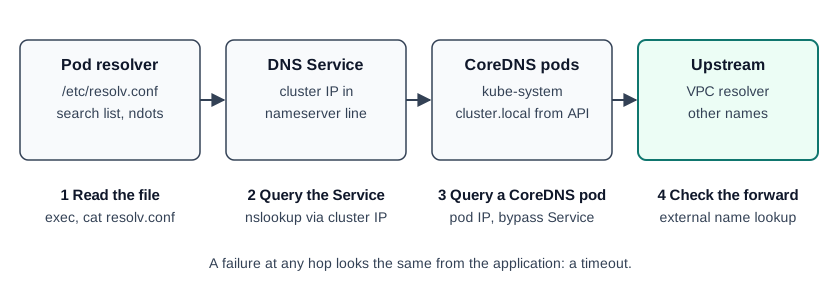 Figure 2: The hops in a Kubernetes DNS lookup, with a check at each one
- Read resolv.conf in the affected pod. Run
kubectl exec -ti dnsutils -- cat /etc/resolv.conf. Confirm the nameserver is the cluster DNS Service IP, and confirm thatndotsis what you expect. Webhooks and a non-defaultdnsPolicycan change this file. - Query the cluster DNS Service. Run
kubectl exec -ti dnsutils -- nslookup kubernetes.default. The Kubernetes debugging guide lists the two error forms to look for. If the Service does not answer, the problem is CoreDNS or its Service. - Query a CoreDNS pod IP directly. Find the pod IPs with
kubectl -n kube-system get pods -l k8s-app=kube-dns -o wide, then query one of them. If the pod answers and the Service does not, the problem is kube-proxy or the CNI rather than DNS. - Turn on the CoreDNS log plugin briefly. Enable it in the Corefile, watch the queries arrive, then turn it off. If a query never appears in the log, it never reached CoreDNS.
- Check the upstream. The Amazon DNS server enforces a quota of 1024 packets per second per network interface, shared with instance metadata and time service requests. A busy node can reach that limit, and the resolver rejects traffic once it does.
On SeaGit clusters, CoreDNS is either the native EKS addon or, on older clusters, the platform's coredns Helm module in kube-system. The Helm module defaults to two replicas, spread by pod anti-affinity. Check which one your cluster runs, and its replica count, with kubectl -n kube-system get deploy coredns before you change anything.
CoreDNS and external-dns are different things
One distinction saves a lot of argument. CoreDNS answers queries inside the cluster. external-dns publishes records outside the cluster, into Route 53 or another provider, so that the rest of the world can find your Services and Ingresses. They share nothing except the acronym. If pods resolve a name but a laptop cannot, the problem is in external-dns, the ownership TXT records it writes, or the zone delegation. CoreDNS is not the place to look first. The DNS and domains page explains how SeaGit wires external-dns to a domain.
How SeaGit handles DNS in clusters
The facts below come from the product documentation and the platform's Terraform, as of October 2026.
- CoreDNS is installed for you. Clusters get CoreDNS as part of the cluster build, either as the native EKS addon or through the platform's Helm module on older clusters. You do not install it by hand.
- Per-pod resolver options are a workload decision. This guide found no platform setting that changes
ndotsfor application pods. For a service that calls many external hosts, setdnsConfigon its Deployment, or use trailing dots in its hostnames, as shown above. - Networks are region-scoped. A SeaGit network (VPC) belongs to one region. CoreDNS forwards external names to the VPC resolver on EKS, so the VPC quota above applies to that network's DNS traffic. The Networks page covers subnets and CIDR ranges.
- Public names come from the domain layer. For a deployment's public URL, the record is written by external-dns and the platform, not by CoreDNS. DNS and domains describes which records the platform writes and what happens when a cluster stops and starts.
The troubleshooting guide lists the error messages you are most likely to see during a DNS incident, with the fix for each.
Frequently asked questions
Why do my Kubernetes DNS lookups take exactly 5 seconds?
That is the resolver's default retry timer, not a slow server. A UDP packet, usually one of the parallel A and AAAA queries, was dropped, most often during a conntrack race on a NAT path. The fix is to remove the race: NodeLocal DNSCache, the glibc single-request-reopen option, or TCP for DNS. Confirm the cause on your own nodes first.
What does ndots:5 do in Kubernetes?
It tells the resolver to try every search domain before the name as written, for any name with fewer than five dots. One external lookup such as api.stripe.com becomes several queries, and each is sent for A and AAAA. Use a trailing dot on hot external hostnames, or set a per-pod dnsConfig with ndots at 2.
CoreDNS works, but my domain does not resolve from outside. Why?
In-cluster resolution and public publishing are separate systems. Check external-dns, the ownership TXT records it writes next to each record, and the zone delegation. The DNS and domains page is the right starting point.
How do I debug a DNS problem from inside a pod?
Start a debug pod, read /etc/resolv.conf, then query the cluster DNS Service IP and a CoreDNS pod IP directly. The first failing hop is the layer to fix. The troubleshooting guide has the error-by-error fixes.
Sources
Checked October 2026.
- Kubernetes: DNS for Services and Pods: the
dnsConfigfield, itsoptionslist, and thendotsexample. - Kubernetes: Debugging DNS Resolution: the
dnsutilsdebugging pattern, the defaultoptions ndots:5line, and the nslookup error forms. - Kubernetes: Using NodeLocal DNSCache: the conntrack race, UDP-to-TCP upgrade and the reason for a node-local cache.
- Kubernetes issue #56903: DNS intermittent delays of 5s: the 5-second symptom, the conntrack race and the kernel-fix comment.
- resolv.conf(5), Linux manual page: the
ndotsdefault of 1, thetimeoutdefault of 5 seconds, andsingle-request-reopen. - AWS: Understanding Amazon DNS: the VPC resolver address (base plus two) and the 1024 packets-per-second quota.