Argo Workflows CI: Kaniko Builds and Exit Handlers
By Muhammad Soliman
Running CI inside the Kubernetes cluster that runs your workloads sounds circular until you try it. The build runs next to the registry and the deploy target, secrets stay inside the cluster boundary, and build capacity scales with the autoscaling you already run. Argo Workflows is the engine that makes this practical. Each pipeline run is a Workflow object, each step is a pod, and the whole pipeline is YAML you can template and version.
This guide covers three parts of an in-cluster pipeline: how a push becomes a Workflow, how to build images without a Docker daemon using Kaniko, and how exit handlers make sure every run reports a final status.
TL;DR
- Keep the event sensor thin. It maps the webhook payload to parameters and creates a Workflow from a WorkflowTemplate. Pipeline logic lives in the template.
- Kaniko builds images from a Dockerfile without a Docker daemon. Its repository was archived in June 2025, so pin the executor image and plan a replacement.
- Layer caching is worth turning on, but only with a cache repository that already exists. A missing cache repository should disable caching, not fail the build.
- Use
onExitfor status reporting. The exit handler runs for Succeeded, Failed and Error, and it reports every one of them.
How a push becomes a Workflow
A push reaches a webhook receiver, which checks the signature and passes the event on. An Argo Events sensor matches the repository and branch, then creates a Workflow from a WorkflowTemplate, passing the commit SHA, repository URL and image name as parameters.
Keeping the templates in the cluster, and not inlining them in the sensor, has one practical benefit. A pipeline change becomes a template upgrade. The sensor stays a small trigger with no business logic to break.
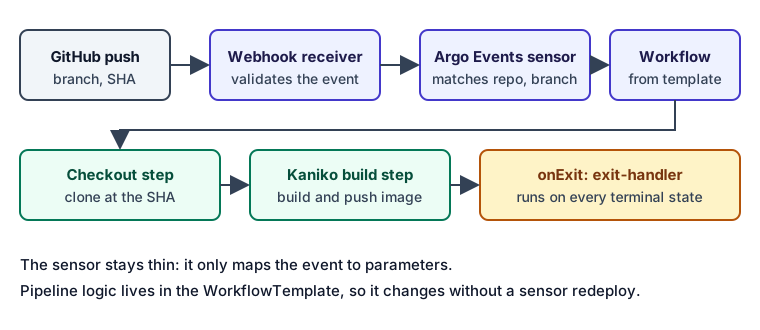 A push becomes a Workflow. The sensor only maps parameters, and the template owns the steps.
A minimal Workflow that runs a build step and an exit handler looks like this. The onExit field is the part this guide depends on:
apiVersion: argoproj.io/v1alpha1
kind: Workflow
metadata:
  generateName: build-
spec:
  entrypoint: main
  onExit: exit-handler
  arguments:
    parameters:
      - name: revision
        value: 3f9c1ab
  templates:
    - name: main
      container:
        image: alpine:3.23
        command: [sh, -c]
        args: ["echo building {{workflow.parameters.revision}}"]
    - name: exit-handler
      steps:
        - - name: report-success
            template: report
            when: "{{workflow.status}} == Succeeded"
          - name: report-failure
            template: report
            when: "{{workflow.status}} != Succeeded"
    - name: report
      container:
        image: alpine:3.23
        command: [sh, -c]
        args: ["echo final status {{workflow.name}} {{workflow.status}}"]
The shape comes from the Argo Workflows exit handler documentation, which states that the exit handler always runs and that {{workflow.status}} is one of Succeeded, Failed or Error. The when conditions above are the same ones that documentation uses.
Why Kaniko for the image build
Building an image inside a pod usually means one of two things: mounting the host Docker socket, which gives the build root-equivalent access to the node, or running a Docker-in-Docker daemon, which needs privileges. Kaniko avoids both. It executes the Dockerfile inside an ordinary container and pushes the result to the registry without a daemon.
Kaniko takes its inputs as flags. The ones this pipeline depends on are below, and they come from the Kaniko README:
--contextpoints at the build context, such as a Git repository or a tarball in a bucket.--destinationsets the full image reference to push, including the tag.--cache=truewith--cache-repostores and reuses layers from a registry repository. If--cache-repois omitted, Kaniko infers acachepath under the destination.
containers:
  - name: kaniko
    image: gcr.io/kaniko-project/executor:<pinned-tag-or-digest>
    args:
      - --context=git://github.com/example/app.git#refs/heads/main
      - --destination=registry.example.com/app:3f9c1ab
      - --cache=true
      - --cache-repo=registry.example.com/app/cache
The image tag above is an example. Pin the executor to a version or a digest you have tested. The Kaniko repository was archived by its owner on 3 June 2025 and is read-only, so new fixes will not arrive from upstream. Plan the replacement now, not during an incident.
Caching: enable it only when the repository exists
Layer caching shortens repeat builds, and it is the first thing most teams turn on. The failure mode is subtle. If the cache repository does not exist, the push to it fails, and the build fails for a reason that does not mention the cache.
The SeaGit default pipeline handles this by treating the cache repository as an input. An empty value disables caching. The code does not guess a name, because the registry may reject a push to a repository that was never created. The rule is simple to copy: caching is on only when something confirms the repository exists. In the default pipeline code, the step checks the cache repository parameter and sets the cache flag only when that parameter is not empty.
A failed cache lookup should slow a build, not fail it. Treat a cache miss as a performance problem, and alert on build time, not on cache errors that do not stop the image from being pushed.
Exit handlers: report every terminal state
Most home-grown CI systems report success at the end of the happy path, and report nothing when a workflow fails halfway or is cancelled. An exit handler closes that gap. Argo runs the onExit template after the entrypoint finishes, whatever the result, and passes the final phase in {{workflow.status}}.
That behaviour is what makes exit handlers suitable for status reporting. The handler can post a commit status to GitHub, call a deployment acknowledgement endpoint, and log the outcome. The GitHub side uses the commit status API, which accepts state values of error, failure, pending or success, plus an optional context, description and target_url. The target_url is the link a reviewer clicks, so set it to the Argo UI page for the run.
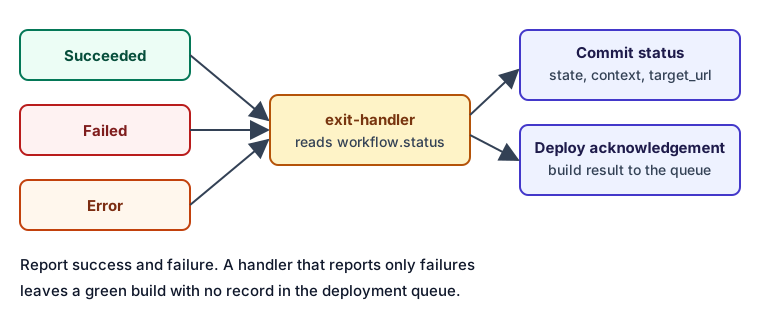 Every terminal phase reaches the exit handler, and the handler reports every one.
Two rules keep this reliable:
- Report every terminal state. If the handler only reports failures, a successful build that the handler never saw is missing from the record. Report success too.
- Keep the handler small. It should send the result and exit. A handler that runs a long build step can itself fail, and then nothing reports the result.
The SeaGit pipeline uses the same pattern. The PR workflow in the argo catalog branches on {{workflow.status}} with one step for success and one for failure, and in that file those steps only log the status. The default pipeline code goes further: it sets onExit on every assembled workflow, and the exit steps send build signals and a commit status with a link to the run. Two details matter. The target_url is the Argo UI page for the run, so reviewers land on the logs. Build signals carry the result back to the deployment queue, so a finished build can proceed or be marked as an error.
Security boundaries
The in-cluster model moves the trust question. The build now runs with cluster network access, and the source it builds may come from a pull request. Four controls reduce the risk:
- Trusted fork owners. Only pull requests from repositories you list as trusted should run the full pipeline with secrets. Everything else should run a status-only check.
- Scoped registry credentials. Give the Kaniko service account push access to one repository, not the whole registry.
- No privileged pods. Run Kaniko as a non-root pod where the base image allows it, and do not grant privileged mode. The Kaniko README states that it relies on the container runtime's security features and does not make untrusted builds safe by itself.
- Short-lived acknowledgement tokens. Callbacks to the deployment API should use a per-build token, not a shared key that lives in every workflow.
When in-cluster CI is the wrong tool
Running CI in the cluster is not always the right call.
- If your builds need macOS or Windows runners, a hosted runner is the simpler choice.
- If your team already runs a mature CI system and only needs image builds and deploys, keep that system and send only the deploy signal to the cluster.
- If the build needs a large amount of memory or a GPU for a short time, a dedicated build node pool or a hosted service may cost less than keeping capacity idle.
How SeaGit handles this
SeaGit runs CI as Argo Workflows in your cluster. There are four routes from a code change to a deployment. The CI/CD routes page describes each route and who owns the trigger.
- Route B (Argo Workflows through SeaGit). The trigger comes through the SeaGit GitHub App, and SeaGit's routing decides what to build and sends it to an Argo pipeline in your cluster.
- Route C (your own argoci webhook). You own the trigger. The default workflow in the argoci add-on still sends build signals and a deployment acknowledgement to SeaGit, so previews, promotion and rollback keep working.
- Routes A and D use a direct build job and your own CI, respectively.
Routes B and C need a node pool for builds and the argoci add-on installed first. The GitOps documentation and the Argo CI/CD setup guide cover the setup order. The builds documentation lists the build options per route.
Limits to know:
- The catalog's Kaniko template uses the
executor:debugtag, which is not pinned. Pin it to a tested tag or digest, and test the cache flags again after any change. - The status and acknowledgement path depends on the GitHub App installation and the deployment API being reachable from the cluster.
- Trust rules for forks are a policy decision. Check the list of trusted owners before you enable a repository that accepts outside pull requests.
Frequently asked questions
How do I build container images in Kubernetes without Docker?
Use Kaniko, or another daemonless builder, from a pod that has the build context and registry credentials. The build runs as an ordinary container, so you need no Docker socket and no privileged Docker-in-Docker sidecar. Pin the executor version, because the upstream repository is archived.
What causes "failed to reserve cache" in Kaniko or Argo?
Start by checking whether the cache repository exists and whether the build identity can push to it. Then check whether two pipelines write to the same cache path at the same time. Turning caching off for one run is the quickest way to confirm that the cache is the cause. A cache failure should slow a build, so do not let it fail the build when the image itself can be pushed.
How do I make CI status always report back to GitHub?
Put the status call in an onExit handler, not at the end of the main template. The handler runs for Succeeded, Failed and Error, so the status is posted even when a step fails or the workflow is cancelled.
Is running CI inside the cluster secure with pull requests from forks?
It can be, if fork pull requests do not get the full pipeline with secrets. Run untrusted fork builds without credentials, and reserve the full pipeline for trusted owners. The Kaniko documentation is clear that the builder does not make untrusted code safe by itself.
Sources
- Argo Workflows: Exit handlers. The
onExitbehaviour and the values ofworkflow.status. - Argo Workflows: Workflow variables. How
{{workflow.*}}and parameter references are substituted. - Kaniko README (GoogleContainerTools/kaniko). The
--context,--destination,--cacheand--cache-repoflags, and the archived status. - GitHub REST API: commit statuses. The
state,context,descriptionandtarget_urlfields. Checked October 2026.